¶ Parameters
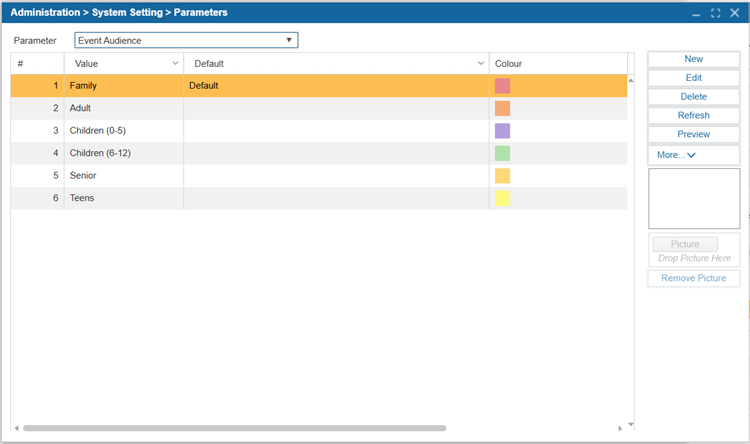
Parameters are the options available in many of the dropdown menus in the ILS. Default parameters are the default values applied in these dropdowns when adding new records. For example, in the City parameter, New York City, Chicago, and Boston may be added as options. If New York City is indicated as the default, New York City will be automatically selected whenever a field for City is available. However, users can utilize the dropdown to select a different Parameter.
¶ Add a New Parameter
- Navigate to Administration > System Settings > Parameters.
- Use the Parameter dropdown to select a parameter section to modify.
- Select New.
- Enter the values.
- Select Default if the value will be shown by default in parameter when it is on a new record.
- Select Save.
- Repeat steps 3-6 to add more values.
- Select Save.
TIP: To exclude a Metadata Source from the Find/Add Item search, go to Administration > Parameters > Metadata Source and check the "Exclude From Find/Add Item Search" checkbox.
¶ Edit Parameters
- Navigate to Administration > System Settings > Parameters.
- Use the Parameter dropdown to select a parameter section to modify.
- Select a parameter from the grid.
- Select Edit.
- Edit the value(s).
- Select Default to set this value as the default parameter shown when a new record is created.
- Select Save.
- Repeat steps 4-8 to add more values.
- Select Save.
¶ Delete a Parameter
- Navigate to Administration > System Settings > Parameters.
- Use the Parameter dropdown to select a parameter section to modify.
- Select the parameter you would like to delete.
- Select Delete.
- Select Yes to confirm deletion.
- Select Save.
¶ Add a Picture
Some parameters may have the option of having a picture attached to them.
- Navigate to Administration > System Settings > Parameters.
- Use the Parameter dropdown to select a parameter section to modify.
- Select the parameter you would like to add a picture to.
- Select Picture and browse for the image on your computer. Alternatively, drag and drop the image file into the drop files here to upload area.
- Select Save.
¶ Remove a Picture
- Navigate to Administration > System Settings > Parameters.
- Select the parameter section you would like to remove pictures from the dropdown menu beside Parameter.
- Select the parameter you would like to remove the picture from.
- Select Remove Picture.