¶ Global Changes
¶ Global Changes: System Defined
The Global Changes feature is useful when a user wants to make changes a bulk change to a group of Patrons that fit a set of specified criteria.
NOTE: Once confirmed, Global Changes are irreversible.
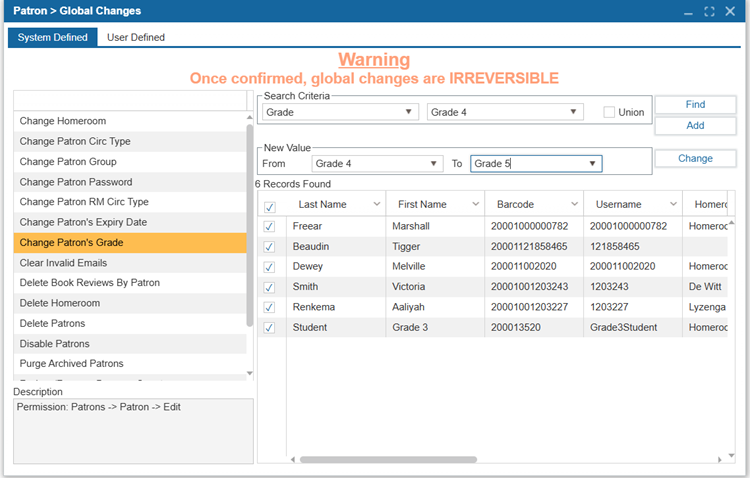
In each Global Change type, you may see the following options:
- Navigate to Patron > Global Changes
- Select the Search Criteria to specify where the change will occur. It is recommended to place patrons in a Subset before performing a Global Change.
2.1. Click Add to add additional Search Criteria if needed.
2.2. Click Remove to remove additional Search Criteria if too many have been added. - Click Find to fill the bottom grid with records that match your criteria then select the required patrons from that list.
- If there is a New Value area, specify the original value in the From field and the new value in the To field.
- Click Change.
- Click Yes to confirm the change.
System Defined Global Change options include:
| Option | Description |
|---|---|
| Change Homeroom | Use this Global Change to change the homeroom of a Subset of Patrons to another homeroom. This change is useful when moving a group of students from one grade to the next, if the homerooms are named after grades. |
| Change Patron Circ Type | This feature changes the Circulation Type for a Subset of Patrons to another Circulation Type. This may be useful if you have a group of Patrons with limited borrowing capability switching to a full borrowing capability circulation type. |
| Change Patron Group | Use this Global Change to change the Patron group of a Subset of Patrons from one Patron group to another. |
| Change Patron Password | Use this global change to apply new patron passwords. The new value can be the patrons' home phone number, first name, last name, or a custom password. |
| Change Patron RM Circ Type | Change the patron RM (resource manager) circulation type for patrons from one RM circ type to another. |
| Change Patron’s Expiry Date | This feature allows users to change multiple Patrons’ Expiry Dates at the same time to a new date. |
| Change Patron’s Grade | This feature allows users to change Patrons’ Grade. |
| Clear Invalid Emails | Clear the Invalid Email checkbox in the Patron profile for multiple patrons. |
| Delete Book Reviews By Patron | Use this global change to delete book reviews by a group of patrons. This will delete the book reviews from the ILS and the Discovery Layer. |
| Delete Homeroom | Use this global change to delete a homeroom. This will remove patrons from the homeroom, but the patron records will not be deleted. |
| Delete Patrons | This feature allows you to delete multiple Patron records at once. |
| Disable Patrons | Use this global change to mark patrons as 'Restrict Online Access' (Patron > Find/Add Patron > Patron tab, which will restrict their access to the Discovery Layer. |
| Purge Archived Patrons | This feature allows you to permanently remove archived Patron records from the system. Once the archived Patrons have been purged, they cannot be restored. |
| Reduce/Remove Damage Count | Use this global change to either reduce the number of damaged item count or remove it entirely from specified patron records. |
| Student Upgrade | Patron grades can level up by using the Students Upgrade. |
| Un-Archive Patrons | This feature allows you to restore Patrons who have previously been archived to the system. |
¶ Global Changes: User Defined
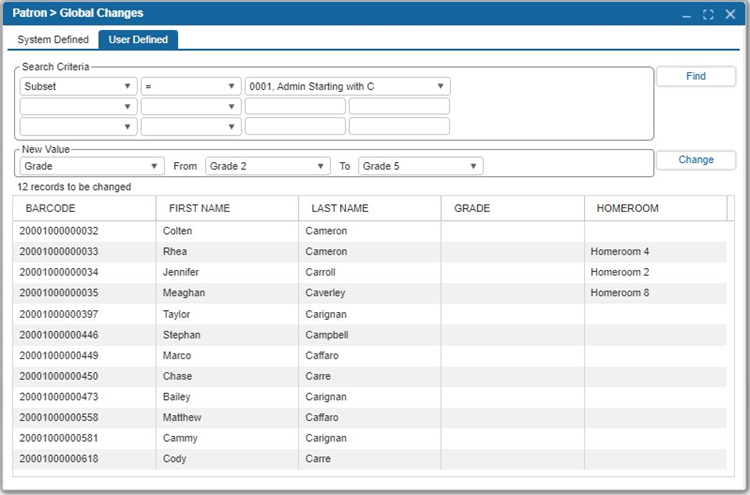
The Global Changes feature enables you to update records that match specific search criteria by applying new values of your choice. Subsets created in the Find/Add Patron section can be particularly helpful for making customized changes to selected records.
NOTE: Once confirmed, Global Changes are irreversible.