¶ Circulation Types
ILS allows users to customize all aspects of circulation. Each library has unique Patron groups with specific circulation requirements. ILS offers a flexible environment that is capable of circulating any collection in a manner tailored to each library’s needs.
¶ Item Circ Type
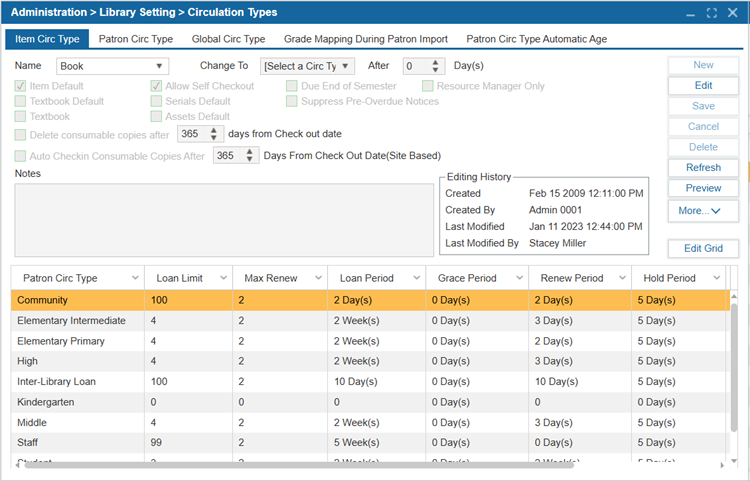
Item Circulation Types are created to identify types of item and set circulation rules. For example, Patrons could borrow DVDs for a maximum of 3 days while books could be borrowed for a maximum of 3 weeks. By creating unique item types, different circulation limits can be defined for each. Common types are Book, Video, Magazine, and CD/DVD. A basic rule is to only create multiple item types if the loaning privileges are different.
¶ New Circ Type
- Navigate to Administration > Library Setting > Circulation Types > Item Circ Type tab.
- Select New.
- Set the necessary values:
| Value | Description |
|---|---|
| Name | Enter the Name of the Item Circ Type (Example: Book, Hourly, DVD, etc.). |
| Item Default | Select this checkbox to set this item as the default to be used when cataloging new items in Catalog > Cataloging > Find/Add Item. |
| Serials Default | Select to set this type as the default to be used when adding new serials. |
| Textbook Default | Select to set this type as the default to be used when adding new textbooks. |
| Change To [Select a Circ Type] After ____ Day(s) | If you would like the circulation type to change automatically after a set period of time, enter the number of days after which the circulation type will change in the After ____ Day(s) box. Below this, use the dropdown to select the circulation type that these items will Change To after the specified period of time. (Example: this function might be used when cataloging New Books that are only lent out for 1 week, whose circulation type may change to Books after a period of time, with a loan period of 2 weeks). |
| Delete consumable copies after ___ days from Check Out date | Select to enable this setting where a consumable copy will be automatically deleted after a specified number of Days From Check Out Date (Site Based). |
| Resource Manager Only | Select to only show this item circulation type for Resource Manager sites. |
| Suppress Pre-Overdue Notices | Select to disable notifications from navigating out to Patrons for this item circulation type. |
| Allow Self-Checkout | When this option is enabled, the item selected in the Name dropdown will be available for checkout through the self-checkout account on the self-checkout machine. |
| Due End of Semester | When this option is enabled, the due dates for the item selected in the Name dropdown will automatically be set to the semester's end date. The semester end date is defined under: Administration > Library Setting > Library Info > Semester/Period/ILL tab. |
| Auto Checkin Consumable Copies After ____ Days From Check Out Date (Site Based) | This setting allows you to specify the number of days after the checkout date for consumable copies to be automatically checked in by the system. Enter the desired number of days in the field provided. Note that this is a site-based setting, meaning it applies specifically to the site where it is configured. |
- Select Save.
- Repeat for as many Item Circ Types are needed.
¶ Edit Circ Type
- Navigate to Administration > Library Setting > Circulation Types.
- Use the dropdown to select Name of an Item Circ Type you would like to edit.
- Select Edit.
- Make any changes as needed.
- Select Save.
¶ Delete Circ Type
- Navigate to Administration > Library Setting > Circulation Types.
- Use the dropdown to select Name of an Item Circ Type you would like to delete.
- Select Delete.
- Select Yes to confirm the deletion.
¶ Patron Circ Type
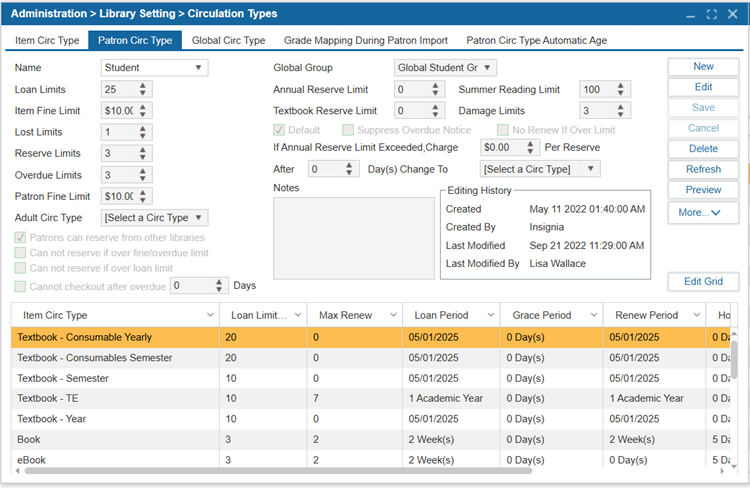
Patron Circulation Types are created to identify groups of patrons with unique circulation rules. For example, Adults could borrow 20 items while Juvenile’s could borrow 10 items. By creating unique patron types, different circulation limits can be defined for each. For example, Adult and Juvenile circulation types or Staff and Student circulation types in a school setting. A basic rule is to only create multiple item types if the loaning privileges are different.
¶ New Patron Circ Type
- Navigate to Administration > Library Setting > Circulation Types.
- Select the Patron Circ Type tab.
- Select New.
- Enter the Name for the new Patron Circ Type.
| Value | Description |
|---|---|
| Default | Select this checkbox to use this Patron Circ Type as the default when new Patrons are added. |
| Loan Limit | Defines the total loan limit for a patron group. It specifies the maximum number of items a patron can check out across all item circulation types combined. |
| Item Fine Limit | Defines the maximum amount of accumulated item fines allowed for a patron group. |
| Lost Limit | Defines the maximum number of accumulated lost items allowed for a patron group. |
| Reserve Limit | Defines the total number of items a patron group can reserve across all circulation types. |
| Overdue Limit | This setting defines the maximum number of accumulated overdue items allowed for a patron group. Once a patron reaches this limit, they will no longer be able to check out any items, regardless of the item circulation type. |
| Patron Fine Limit | This setting defines the maximum accumulated fine limit for a specific patron group. |
| Adult Circ Type | This setting allows the system to automatically move patrons from one group to another based on their age which should be defined under the Patron > Find/Add Patron > Patron tab. For example, a “Child” patron group (defined in the Name field) would be automatically moved to the “Adult” group when they reach the appropriate age which will be defined under Custom Setting “JuvenileAge”. This feature ensures that juvenile patrons are transitioned to the adult patron group automatically. |
| Suppress Overdue Notice | Select to supperess overdue messages from being sent to this Patron Circ Type. Fine messages will still be sent. |
| No Renew If Over Limit | Select to disable renewals for Patrons who have surpassed any limit set in this window. |
| Global Group | If these Patrons will be borrowing items from other libraries in your district, select a Global Group. Global Groups are created by the system administrator. For further instructions, navigate to the Global Circulation Type section of the user manual. |
| If Annual Reserve Limit Exceeded Charge $____ Per Reserve | Set these values to set an annual maximum amount of reserves for this Patron circulation type. If the Patron exceeds the maximum number of reserves for that year, they can continue to reserve items but will be prompted about the amount charged per reserve on the Discovery Layer. In the ILS, a prompt will notify you that the Patron has reached their maximum annual reserve limit. |
| Patron can reserve from other libraries | Select to allow Patrons in this circulation type to reserve items from other libraries. |
| Cannot reserve if over fine/overdue limit | Select to restrict Patrons from reserving items if they are exceeding their fine and/or overdue items limit. |
| Cannot reserve if over loan limit | Select to restrict Patrons from reserving items if they are exceeding their loan limit. |
| Cannot checkout after overdue ____ Days | This setting defines the number of days a patron can have overdue items before they are no longer able to check out any additional items. Once the specified number of days is reached, the patron will be restricted from checking out new items until the overdue items are returned. |
| Notes | The Notes area is used to capture any additional information or comments relevant to a specific Patron Circ Type. This can include special instructions, reminders, or details that do not fit into other designated fields. Notes can help provide context or clarification for staff. |
| Editing History | The Editing History area tracks changes made, providing a detailed log of actions taken, along with the date and user responsible for each modification. |
| Summer Reading Limit | The Summer Reading Limit defines the maximum number of items a patron in the specified group can check out across all item circulation types during the Summer Reading Program. |
| Damage Limit | This setting defines the maximum number of accumulated damaged items allowed for a specific patron group. |
| After _____ Days Change to [Select a Circ Type] | If you would like the patron circulation type to change automatically after a set period of time, enter the number of days after which the patron circulation type will change in the After ____ Day(s) box and use the Change To dropdown to select the new patron circulation type. |
- Specify all the parameters for this Patron Circ Type in the upper of the window. These are overall loan parameters which are limits imposed on all the Item Circ Types combined. (For example, even if a Patron Circ Type is allowed to take out 10 books and 10 magazines, if their overall Loan Limit is set to 15, they will only be able to take out 15 items total).
- Select Save.
¶ Edit Patron Circ Type
- Navigate to Administration > Library Setting > Circulation Types.
- Select the Patron Circ Type tab.
- Select a Patron Circ Type Name from the list you would like to edit.
- Select Edit.
- Make any changes needed.
- Select Save.
¶ Delete Patron Circ Type
- Select Administration > Library Setting > Circulation Types.
- Select the Patron Circ Type tab.
- Select a Patron circulation type Name from the list to delete.
- Select Delete.
- Select Yes to confirm deletion.
¶ Modifying Loan Parameters
To change the loan limits for a specific Item or Patron Circ Type, you can use the lower grid in either the Item Circ Type or Patron Circ Type tabs.
- Navigate to Administration > Library Setting > Circulation Types.
- Select either the Item Circ Type or Patron Circ Type.
NOTE: The corresponding type will be updated in the table in the other tab.
- Select the Name from the drop-down menu.
- Select the Item Circ Type or Patron Circ Type in the lower grid that you want to edit loan limits for.
- Select Edit Grid or double-click the selection.
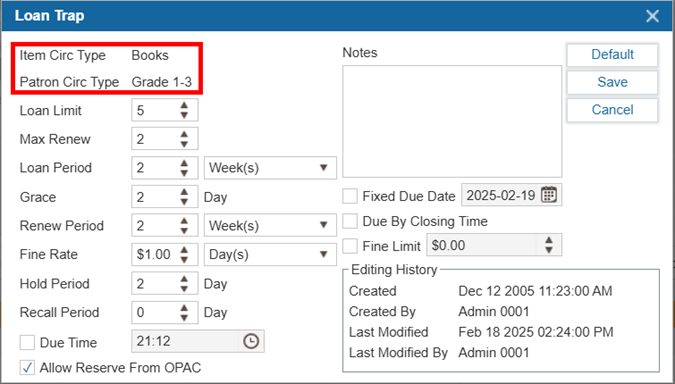
- Set up the loan settings in the Loan Trap window:
| Value | Description |
|---|---|
| Loan Limit | The maximum number of items of this type that a Patron can Check Out at a given time. This number cannot exceed the overall loan limit set in Patron Circ Type. |
| Max Renew | The number of times an item of this type can be renewed. |
| Loan Period | The length of time the item is checked out for. Unit options include hours, days, weeks, months, years, semesters, or academic years. NOTE: Semesters and Academic Years can be configured under Administration > Library Setting > Library Info > Semester/Period/ILL tab. |
| Grace | The period between the item being marked as overdue and fines beginning to accrue. Set the grace period to 0 to indicate fines should be charged as soon as an item is overdue. |
| Renew Period | The length of time the item is checked out after renewal. Unit options include hours, days, weeks, months, years, semesters, or academic years. |
| Fine Rate | The rate at which overdue fines are calculated for the item type. |
| Hold Period | This value represents the number of days for which items will remain on reserve. |
| Recall Period | When a library issues a recall notice for an item, the recall period is the number of days a patron has to return an item before the item is considered as overdue. |
| Due Time | A specific time of day when items will become overdue. |
| Allow Reserve from OPAC | When enabled, Patrons will be able to place reserves on this type of item from the Discovery Layer. |
| Notes | Enter any relevant notes to the circulation type in this field. |
| Fixed Due Date | When enabled, the item will always be due on the selected date. |
| Due By Closing Time | When enabled, the item will be considered overdue on the due date after the library’s closing time. |
| Fine Limit | This setting allows you to define the maximum fine limit for a specific item. |
| Default (Button) | Clicking on the Default button in the Loan Trap window resets the loan parameters (e.g., Loan Limit, Max Renew, Loan Period, etc.) to match those set for the Default Item Circ Type. Example: If the Item Circ Type "Book" is set as the default for Patron Circ Type "Staff", then when modifying or adding a new Item Circ Type (e.g., Graphic Novels) for the same patron type, clicking the Default button will automatically copy the loan parameters from "Book" to "Graphic Novels". |
- Select Save.
¶ Global Circ Type
Global groups specify parameters used for Inter-branch lending. Every Patron Circ Type has a Global Circ Type for the system to apply the appropriate circulation parameters during inter-branch lending.
NOTE: Patron groups that do not have a Global Circ Type cannot borrow books from other libraries.
Login as Admin All to create Global Circ Types. Enable Global Circ Types with the Item Circ Type as system-based, not site-based, select Administration > System Setting > Custom Setting and set District Based to 1.
Additionally, the UseGlobalLoanTrapForReserve custom setting determines how circulation rules are applied when a patron borrows an item from another library:
- Value 0: Uses circulation rules from the library that owns the copy record.
- Value 1: If the patron’s library is different from the copy’s library, the system applies the Global Loan Trap using the patron's library rules.
- Value 2: Uses the circulation rules of the loaning library (i.e., if the copy belongs to Library A but is checked out at Library B, Library B’s circulation rules apply).
This setting ensures proper circulation rule enforcement for inter-branch lending and reservations.
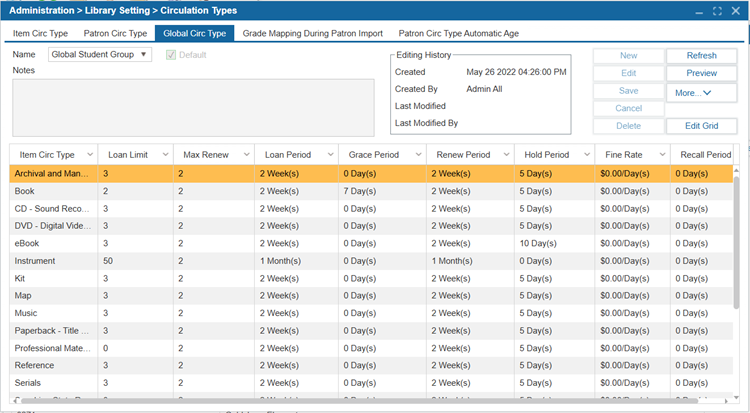
¶ New Global Circ Type
- When logged in as Admin All, navigate to Administration > Library Setting > Circulation Types.
- Select the Global Circ Type tab.
- Select New.
- Enter the Name of the Global Circ Type.
- Select the Default checkbox to set this global circ type as the default.
- Select Save.
- Select Edit Grid or double-click the row.
- Set up the loan settings in the Loan Trap window.
- Select Save.
¶ Edit Global Circ Type
- When logged in as Admin All, navigate to Administration > Library Setting > Circulation Types.
- Select the Global Circ Type tab.
- Select Name of a Global Circ Type from the dropdown list you would like to edit.
- Select Edit.
- Make any changes needed.
- Select Save.
¶ Delete Global Circ Type
- When logged in as Admin All, navigate to Administration > Library Setting > Circulation Types.
- Select the Global Circ Type tab.
- Select Name of a Global Circ Type from the dropdown list to delete.
- Select Delete.
- Select Yes to confirm deletion.
¶ Grade Mapping During Patron Import
Grade mapping assigns Patron circulation types to certain grades for circulation purposes. This feature is useful for K-12 libraries where data is imported from their student information system and the school has different loan periods for different grades. Once this feature is enabled, the system will automatically change the circulation type based on the grade in which the student is enrolled.
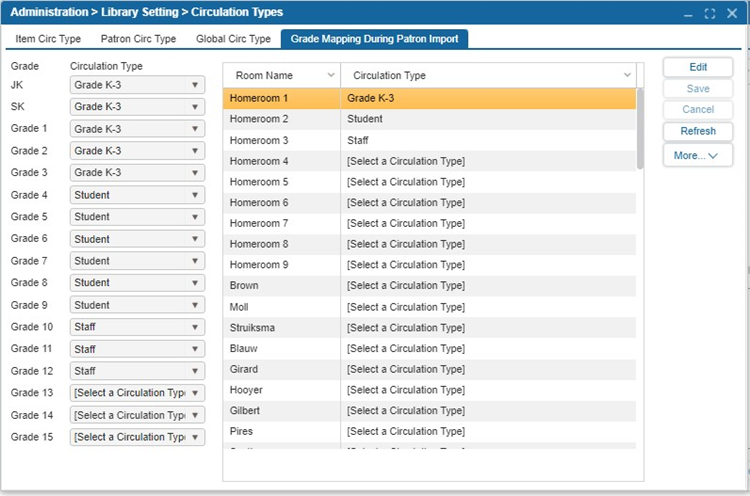
NOTE: When configuring the Grade Mapping feature, please be aware that changes will only apply to patron accounts that meet the criteria after the nightly import process.
¶ Edit Grade Mapping
- Navigate to Administration > Library Setting > Circulation Types.
- Select the Grade Mapping During Patron Import tab.
- Select Edit.
- From the dropdown menu choose the Patron Circ Type to assign to each grade.
- Select Save.
¶ Patron Circ Type Automatic Age
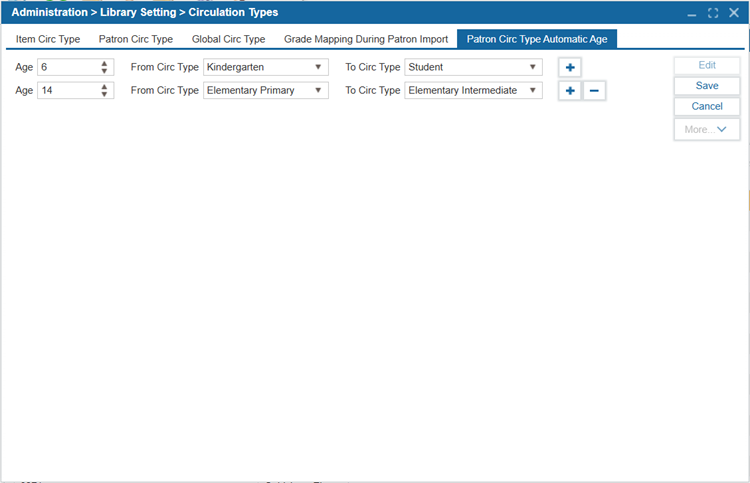
This feature allows users to automatically change a patron's circulation type based on their age which is defined by the birthdate field in Patron > Find/Add Patron > Patron tab . The system performs a nightly check, and if it identifies a patron in the specified "From Circ Type" group who has reached the designated age, it will automatically update the patron to the new specified circulation type. For example, when a patron is 18 and, in the Teen circ type, they should be automatically switched to the Adult circ type.
- Select Edit
- Specify the patron age
- Specify the current patron circ type.
- Specify the new patron circ type.
- Add a new line using the + button if needed
- Select Save
- In Administration > Circulation Types > Patron Circ Type Automatic Age, users can specify an age, the current circulation type, and the new circulation type.