¶ ERM
The ERM (Electronic Resource Manager) is used to keep track of database subscriptions and their relevant information. This feature is different from the Digital Asset Manager as it doesn't catalogue individual items, but rather helps organize database information such as relevant URLs, subscription costs, and due dates, to better manage subscriptions.
¶ Find a Resource
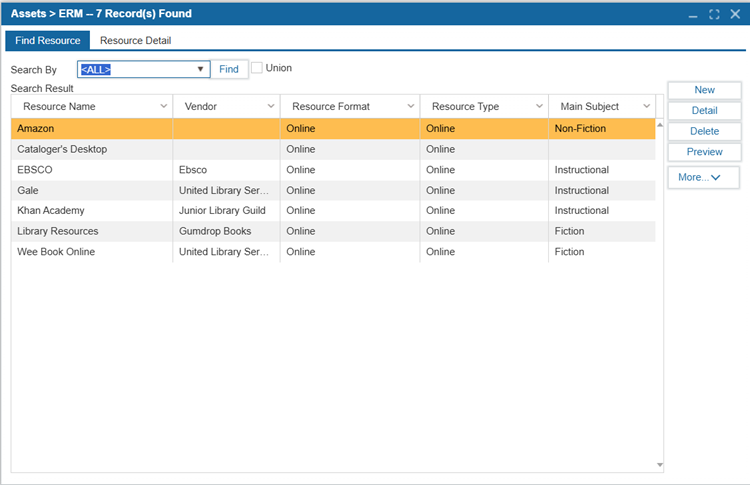
1. Navigate to Assets > ERM
2. Enter search criteria and Select Find.
2.1 Select Union if you would like to see all records matching the search criteria in the system/district.
3. To view detailed information about a resource, either double-click a record or select the record and select the Resource Detail tab.
¶ Create a New Resource
1. Navigate to Assets > ERM
2. Select New.
3. Enter the information for the new resource, including:
| Field | Description |
|---|---|
|
Resource Name
|
The name of the resource. |
| Description | The description of that resource. |
| Cover Image | Add the cover image of the resource. |
| Primary URL | The main URL associated with the resource. |
| Alternate URL | If the resource has additional URLs, please add them in the box. |
| Resource Format | A dropdown menu displays the resource format (e.g., Online). |
| Resource Type | Choose the resource type from the available options in the dropdown menu. |
| Vendor | The vendor through which the resource is procured. |
| Acquisition Status | Indicates if the subscription has been paid for or not. |
| Subscription Cost | The user is charged for the resource according to how long they use it. |
| Active | When checked, this resource is marked as currently available for patron access. Uncheck to hide it from the record for reporting. |
| Add Resource Document | Click the Browse button to add documents from the system. The system will automatically display the Name, Type, and Location of the document in the ILS. To remove an added document, click Delete. |
| ISSN | The International Standard Serial Number for journal/database identification. |
| Main Subject | The primary subject category (e.g., "Instrument," "Fiction"). Configured in Administration > Parameters > ERM Subjects. |
| Other Subject 1 - 5 | Secondary subject categories for cross-disciplinary resources. (Optional fields) |
| Subscribe From – To | The active subscription period. |
| Renew Date | The next scheduled renewal date. |
| Date of Payment | The date the subscription fee was processed. Helps align with fiscal year tracking and renewal workflows. |
| Date Discontinued | The date when the resource was deactivated or canceled. Used for tracking subscription lifecycles and financial reporting. |
| Notes | Internal notes about vendor contracts, access restrictions, or administrative details. Not visible on OPAC. |