¶ Site Management
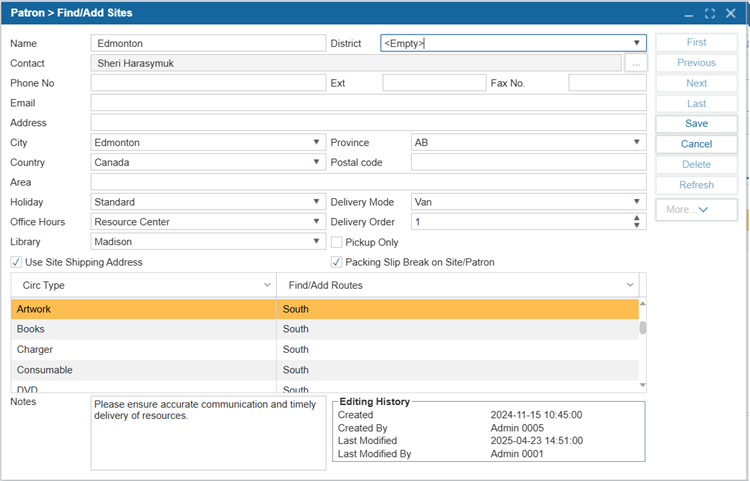
The Find/Add Site window in the Resource Manager, used for configuring sites, helps identify and manage the appropriate delivery locations for booked resources.
¶ Add a New Site
- Navigate to Patron > Find/Add Site.
- Select New.
- Enter the site information:
| Option | Description |
|---|---|
| Name | The name of the site. |
| District | The district the site belongs to. Note: The users can add new districts to this dropdown by going to Administration > System Settings > Parameters. |
| Contact | Name of the contact person at this site. Note: This individual must first be added through the Patron > Find/Add Patron window. |
| Phone No | The phone number for the site. |
| Ext | Phone extension number, if applicable. |
| Fax No. | Fax number for the site, if used. |
| Email address for the site. | |
| Address | Mailing or physical address of the site. |
| City | The city where the site is located. Note: To add new cities to this dropdown by going to Administration > System Settings > Parameters. |
| Province | The province in which the site is located. Note: To add new provinces to this dropdown, navigate to Administration > System Settings > Parameters. |
| Country | The country where the site is located. Note: To add new countries to this dropdown, navigate to Administration > System Settings > Parameters. |
| Postal Code | ZIP or postal code for the site. |
| Area | Can be used for an additional geographic division. |
| Holiday | Specifies the holiday schedule for the site. Note: To add holidays, navigate to Administration > Library Setting > Library Info > Office Hours/Holidays tab. |
| Office Hours | Indicates the office hours for the site. Note: To add office hours, navigate to Administration > Library Setting > Library Info > Office Hours/Holidays tab. |
| Delivery Mode | How items are delivered (e.g., Van). Options may include Van or Mail. |
| Delivery Order | Used to define the order of delivery when items are being routed. |
| Library | The library associated with the site. |
| Pickup Only (checkbox) | When checked, patrons linked to this site can only pick up resources. As a result, the Pickup option will be automatically selected, and the Delivery option will be disabled when booking items through the OPAC or via Circulation > CheckOut > Booking tab. |
| Use Site Shipping Address (checkbox) | When checked, the site’s shipping address is used for deliveries. |
| Packing Slip Break On Site/Patron (checkbox) | When enabled, a separate packing slip is created for each site or patron when printing from the Circulation > Items To Checkout window by selecting the Packing Slip button. |
| Notes | Free-text field for additional instructions or comments about the site. |
| Editing History | The Editing History area tracks changes made, providing a detailed log of actions taken, along with the date and user responsible for each modification. |
- Assign Routes to Circulation Types in the lower grid.
- Select Save.
¶ Delete A Site
- Navigate to Patron > Find/Add Site.
- Select the site you would like to delete from the Name dropdown list.
- Select Delete.